
What happens if a shopper checks out with CashBack and a coupon in their cart?
Brands can choose whether CashBack can be stacked with coupons or whether CashBack should be voided any time a coupon is used at checkout.
Options Overview
You control this behavior at the promotion level in your Brand Admin. For each CashBack promotion, you can choose:
- No coupon stacking – CashBack is voided whenever a coupon is used.
- All coupons – CashBack can stack with any Shopify coupon.
- Only specific coupons – You can select which Shopify static discount codes can stack with this CashBack promotion.
Default behavior: No coupon stacking
By default, if a shopper checks out with both CashBack and a coupon in their cart, we protect your brand by automatically voiding CashBack. With this default setting, CashBack is automatically suspended and the shopper will not receive a CashBack redemption email.
If you look at the order within your Brand Admin, the CashBack will show as suspended due to coupon code being used.

Additionally, at checkout, we alert shoppers that CashBack cannot be combined with any other offers.

Allow CashBack to stack with all coupons
You can also choose to allow CashBack stacking with all coupons.
If you turn on stacking and choose All coupons:
- Shoppers can apply a coupon and still earn CashBack on the same order.
- Shoppers will get CashBack based on the discounted amount (i.e., the order amount after the coupon is applied).
- The CashBack promotion remains active, and the shopper will:
- See that CashBack is available
- Receive the CashBack redemption email after purchase (assuming they meet the promo criteria).
Allow CashBack to stack with only specific coupons
If you turn on stacking and choose only specific coupons:
-
You can select which specific Shopify discount codes are allowed to stack with CashBack.
When a shopper checks out:
- If they use a coupon code eligible for CashBack stacking:
- CashBack applies based on the discounted amount (i.e., the order amount after the coupon is applied).
- The CashBack widget continues to show that they’ll earn CashBack.
- The shopper receives the CashBack redemption email (if eligible).
- If they use a coupon code eligible for CashBack stacking:
- If they use an ineligible coupon code:
- CashBack is voided for that order.
- The widget updates to indicate CashBack is not available with that coupon.
- In Brand Admin, the CashBack will show as suspended due to coupon code usage.
This is helpful if you only want “double dip” behavior for certain promotions or upsells.
How to manage CashBack + coupon stacking settings
You can control stacking on individual CashBack promotions:
- Go to your Brand Admin.
- Create a new CashBack promotion or edit an existing one.
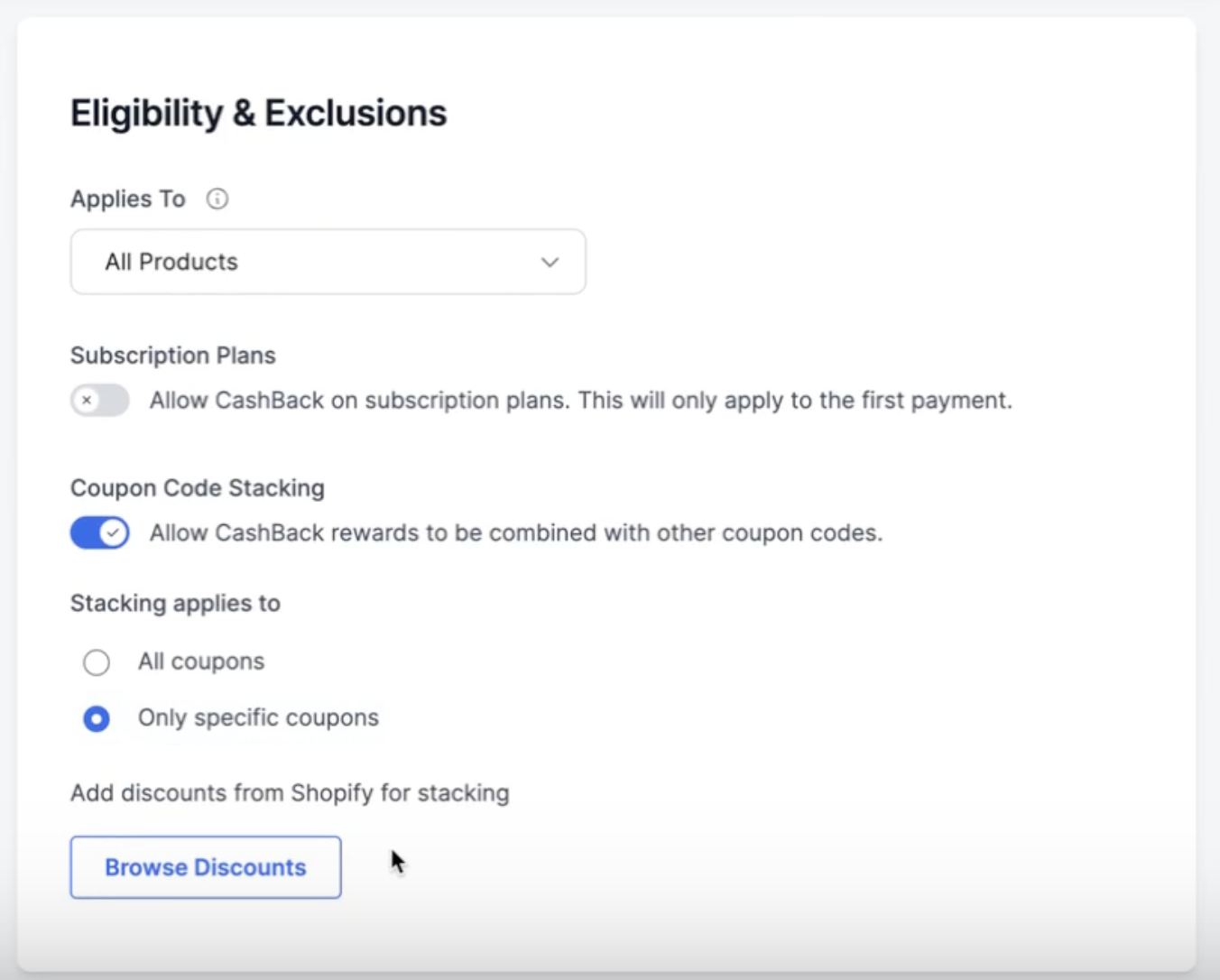
- In the Eligibility & exclusions section, find Coupon Code Stacking.
- Toggle the setting on and choose one of the options:
- No coupon stacking – CashBack is voided whenever a coupon is used.
- All coupons – CashBack can stack with any coupon.
- Only specific coupons – Select specific Shopify static discount codes that are allowed to stack with CashBack.
When you save the promotion, those stacking rules will apply immediately to new orders.
Key Information
- Stacking currently supports Shopify static discount codes (codes that don’t change per-customer).
- You can update stacking settings any time by editing the promotion; future orders will follow the new rules.